
Quick Reference
Fast lookup for common Git commands. For detailed explanations, click on any command.
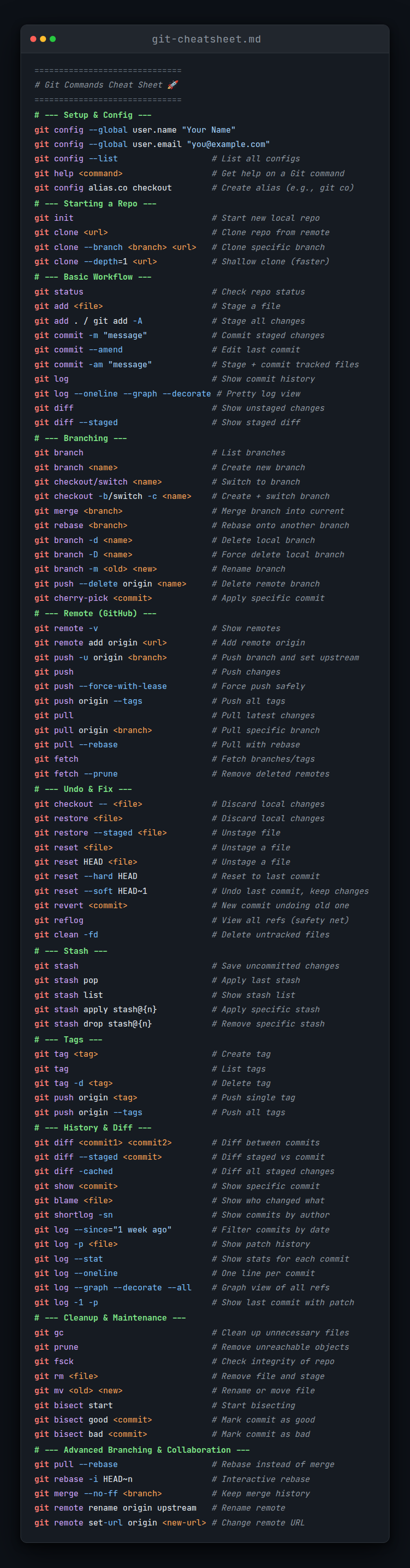
Command Categories
Jump to: Setup • Create • Snapshot • Branch • Share • Inspect • Patch • Debug • Admin
Setup and Config
| Command | Description |
|---|---|
git config --global user.name "name" | Set the name attached to commits |
git config --global user.email "email" | Set the email attached to commits |
git config --global color.ui auto | Enable colorization of command output |
git config --list | List all configured settings |
git help <command> | Get help for a Git command |
Getting and Creating Projects
| Command | Description |
|---|---|
git init | Initialize a new Git repository |
git init <directory> | Create a new local repository in specified directory |
git clone <url> | Clone a repository from a remote source |
git clone <url> <directory> | Clone a repository into a specific directory |
Basic Snapshotting
| Command | Description |
|---|---|
git status | Show the status of the working directory |
git add <file> | Add a file to the staging area |
git add . | Add all new and changed files to staging |
git add -p | Interactive staging - choose hunks to add |
git diff | Show unstaged changes |
git diff --staged | Show staged changes |
git commit -m "message" | Commit staged changes with a message |
git commit -am "message" | Stage all tracked files and commit |
git commit --amend | Amend the last commit |
git restore <file> | Discard changes in working directory |
git restore --staged <file> | Unstage a file |
git reset <file> | Unstage a file (keep changes) |
git reset --hard HEAD | Discard all local changes |
git rm <file> | Remove file from working directory and staging |
git mv <old> <new> | Rename or move a file |
Branching and Merging
| Command | Description |
|---|---|
git branch | List all local branches |
git branch -a | List all branches (local and remote) |
git branch <branch> | Create a new branch |
git branch -d <branch> | Delete a branch |
git branch -m <new-name> | Rename current branch |
git checkout <branch> | Switch to a branch |
git checkout -b <branch> | Create and switch to new branch |
git switch <branch> | Switch to a branch (modern) |
git switch -c <branch> | Create and switch to new branch (modern) |
git merge <branch> | Merge a branch into current branch |
git merge --no-ff <branch> | Merge with a merge commit |
git merge --abort | Abort a merge in progress |
git log | Show commit history |
git log --oneline | Show compact commit history |
git log --graph --all | Show branch graph |
git stash | Temporarily save uncommitted changes |
git stash pop | Apply and remove most recent stash |
git stash list | List all stashes |
git tag <name> | Create a lightweight tag |
git tag -a <name> -m "msg" | Create an annotated tag |
Sharing and Updating Projects
| Command | Description |
|---|---|
git remote -v | List all configured remotes |
git remote add <name> <url> | Add a new remote |
git remote remove <name> | Remove a remote |
git fetch | Download objects and refs from remote |
git fetch <remote> | Fetch from specific remote |
git pull | Fetch and merge from remote |
git pull --rebase | Fetch and rebase from remote |
git push | Push changes to remote |
git push <remote> <branch> | Push branch to remote |
git push -u <remote> <branch> | Push and set upstream |
git push --force-with-lease | Safely force push |
git push --tags | Push all tags to remote |
Inspection and Comparison
| Command | Description |
|---|---|
git show <commit> | Show changes of a commit |
git show HEAD | Show last commit |
git log | Show commit history |
git log --follow <file> | Show commit history for file |
git log --author="name" | Filter commits by author |
git log --grep="pattern" | Search commit messages |
git log --since="2 weeks ago" | Filter by date |
git diff <branch1>..<branch2> | Compare two branches |
git diff <commit1> <commit2> | Compare two commits |
git shortlog | Summarized commit history |
Patching
| Command | Description |
|---|---|
git cherry-pick <commit> | Apply a commit to current branch |
git cherry-pick --abort | Abort cherry-pick |
git rebase <branch> | Rebase current branch onto another |
git rebase -i HEAD~<n> | Interactive rebase last n commits |
git rebase --continue | Continue after resolving conflicts |
git rebase --abort | Abort rebase |
git revert <commit> | Create new commit that undoes a commit |
git revert --no-commit <commit> | Revert without auto-committing |
Debugging
| Command | Description |
|---|---|
git bisect start | Start binary search for bad commit |
git bisect bad | Mark current commit as bad |
git bisect good <commit> | Mark commit as good |
git bisect reset | End bisect session |
git blame <file> | Show who changed each line |
git blame -L 10,20 <file> | Blame specific line range |
git grep <pattern> | Search for pattern in tracked files |
Administration
| Command | Description |
|---|---|
git clean -n | Show what would be deleted |
git clean -f | Delete untracked files |
git clean -fd | Delete untracked files and directories |
git gc | Cleanup and optimize local repository |
git fsck | Verify database integrity |
git reflog | Show reference log (recovery tool) |
git reflog show <branch> | Show reflog for specific branch |
Common Workflows
Start a new project
bash
git init
git add .
git commit -m "Initial commit"
git remote add origin <url>
git push -u origin mainClone and work on existing project
bash
git clone <url>
cd <project>
git checkout -b feature/my-feature
# Make changes
git add .
git commit -m "Add feature"
git push -u origin feature/my-featureUpdate local repository
bash
git fetch origin
git pull origin main
# or
git pull --rebase origin mainFix last commit
bash
# Forgot to add file
git add forgotten-file.txt
git commit --amend --no-edit

# Fix commit message
git commit --amend -m "New message"Undo changes
bash
# Undo unstaged changes
git restore <file>

# Undo staged changes
git restore --staged <file>

# Undo last commit (keep changes)
git reset --soft HEAD~1

# Undo last commit (discard changes)
git reset --hard HEAD~1Resolve merge conflicts
bash
git merge feature-branch
# Conflicts occur
# Edit files to resolve conflicts
git add <resolved-files>
git commitGit Cheat Sheet (One Page)
Setup
bash
git config --global user.name "Name"
git config --global user.email "email@example.com"Create
bash
git init
git clone <url>Local Changes
bash
git status
git diff
git add .
git commit -m "Message"Branch
bash
git branch
git checkout -b <branch>
git merge <branch>Remote
bash
git remote -v
git fetch
git pull
git pushHistory
bash
git log
git log --oneline --graph
git show <commit>Undo
bash
git restore <file>
git reset --soft HEAD~1
git revert <commit>See Also
- Complete Command List - All Git commands alphabetically
- Glossary - Git terminology explained
- Guides - Workflow guides and best practices
- FAQ - Frequently asked questions
Tip: Bookmark this page for quick reference. Use Ctrl+F / Cmd+F to search for specific commands.